
Download MealByMeal – AI‑Powered Calorie Counting & Meal Tracking Tool
Overview – Why MealByMeal Is Changing the Way We Log Food
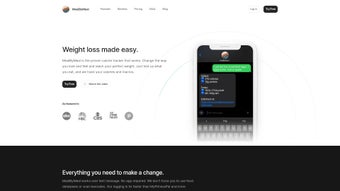
MealByMeal is an innovative, AI‑driven web application that turns ordinary text messages into a sophisticated calorie‑counting and meal‑tracking system. Unlike traditional nutrition apps that demand you download bulky software or manually input data through clunky forms, MealByMeal lets you simply send a text describing what you ate, the portion size, and any relevant details. Powered by ChatGPT and backed by scientific research on the benefits of meal logging, the platform instantly translates your messages into accurate estimates of calories, protein, carbohydrates, and fats. The flexibility of the input format—whether you write “2 eggs, 1 slice toast, 150 g Greek yogurt” or a more conversational “had a big breakfast with eggs and toast”—means you can stay consistent without feeling constrained.
Premium features, such as voice‑command integration with Siri or Google Assistant and deeper analytics, are offered at an affordable price, making MealByMeal a comprehensive yet accessible solution for anyone aiming to manage weight, improve nutrition, or simply stay aware of daily intake. By removing the friction of conventional apps, MealByMeal empowers users to focus on what matters most: healthy eating habits. The service also includes a robust privacy framework, ensuring that every message you send is encrypted end‑to‑end and stored only on GDPR‑compliant servers. This combination of convenience, accuracy, and security creates a compelling value proposition for a wide audience—from busy professionals to fitness enthusiasts and families looking to teach children healthier habits.
In addition to its core functionality, MealByMeal continuously learns from the collective data of its user base, refining its food database and improving portion‑size recognition over time. This community‑driven enhancement loop means that the more you use the platform, the smarter it becomes, delivering increasingly precise macro breakdowns. Whether you are tracking a simple sandwich or a multi‑course dinner, MealByMeal aims to provide a seamless experience that feels as natural as texting a friend, while delivering the analytical depth of a full‑featured nutrition app.
Key Features – What Sets MealByMeal Apart
- AI‑Enhanced Text Logging: Uses advanced natural‑language processing to interpret free‑form messages and generate precise nutrient breakdowns.
- Cross‑Platform Accessibility: Works on any device with a web browser and a texting capability—no dedicated app required for Windows, macOS, Android, or iOS.
- Voice Assistant Integration: Seamlessly connects with Siri and Google Assistant, allowing hands‑free meal entries via voice commands.
- Dynamic Accuracy Improvement: The more specific your input (e.g., weight, cooking method), the more accurate the AI’s estimates become over time.
- Premium Nutrition Dashboard: Offers detailed weekly and monthly reports, goal tracking, and macro‑balance visualizations for a modest subscription fee.
- Secure Cloud Storage: All logs are encrypted and stored in GDPR‑compliant servers, ensuring privacy and data protection.
- Export & Sync Options: Export your data as CSV or sync with popular fitness platforms like MyFitnessPal and Apple Health.
- Research‑Backed Benefits: Built on studies showing that consistent meal logging can boost weight‑loss success by up to 25%.
- Customizable Alerts: Set reminders for meal times, hydration, or macro targets, and receive push notifications via SMS or email.
- Multi‑User Family Accounts: Manage separate profiles for each family member under a single subscription, keeping individual data private yet centrally accessible.
Pros
- Ultra‑convenient—log meals via text or voice without opening an app.
- Highly accurate nutrient estimates that improve with user specificity.
- Low learning curve; natural language input feels intuitive.
- Affordable premium tier with advanced analytics.
- Strong data security and privacy safeguards.
- Family‑friendly multi‑profile support.
- Exportable data for deep analysis or backup.
Cons
- Relies on internet connection for AI processing.
- Free tier limits the number of daily entries.
- Complex meals may require additional clarification for best accuracy.
- Voice‑assistant setup can be slightly technical for non‑tech‑savvy users.
- No native offline mode for emergency logging.
Installation & Usage Guide – Getting Started in Minutes
Starting with MealByMeal is straightforward, regardless of your operating system. Follow these steps to begin tracking your nutrition instantly:
Step 1 – Create an Account
Visit the official MealByMeal website and click “Sign Up.” Provide a valid email address, create a strong password, and verify your account through the confirmation link sent to your inbox. The registration process is free and takes under two minutes. During sign‑up you can also choose between a personal or family plan, and optionally enter a referral code for a free month of premium features.
Step 2 – Set Up Your Texting Number
After logging in, navigate to the “Connect Phone” section. Here you can either use your existing mobile number or obtain a dedicated virtual number provided by MealByMeal. The virtual number is especially handy if you want to keep personal and nutrition texts separate. If you opt for the virtual number, the system will guide you through a quick verification via a one‑time PIN sent by SMS.
Step 3 – Configure Voice Assistant (Optional)
For hands‑free logging, enable the integration with Siri or Google Assistant. On iOS, go to Settings → “Add to Siri” and record a custom phrase like “Log my meal.” On Android, open the Google Assistant settings, select “Add Routine,” and link it to your MealByMeal account. Once linked, you can say “Hey Google, log dinner” and then dictate the details.
Step 4 – Log Your First Meal
Simply send a text to your MealByMeal number. Example: “Breakfast: 2 scrambled eggs, 1 slice whole‑grain toast, 200 ml orange juice.” The AI will respond within seconds with a breakdown, such as “Calories: 350 kcal, Protein: 18 g, Carbs: 30 g, Fat: 12 g.” You can also ask follow‑up questions like “What’s the macro ratio?” to get deeper insights. If the AI needs clarification, it will prompt you with a short question (e.g., “Did you use butter on the toast?”) to refine the estimate.
Step 5 – Review Your Dashboard
Log in to the web portal to view your daily, weekly, and monthly summaries. The premium dashboard provides visual charts, trend analysis, and suggestions for adjusting macros to meet personal goals. Export options let you download your logs for personal records or to import into other fitness apps. You can also set custom alerts for reaching calorie limits or staying within macro ratios, which are delivered via SMS or email.
Overall, the setup process takes less than ten minutes, and once configured, MealByMeal becomes an invisible yet powerful ally in your nutrition journey. Whether you prefer texting, voice, or a hybrid approach, the platform adapts to your workflow without demanding constant manual entry.
Compatibility, Pros & Cons – Who Can Benefit and What to Consider
MealByMeal is a web‑based service, which means it runs on any modern browser (Chrome, Firefox, Safari, Edge) across Windows, macOS, Linux, Android, and iOS. Because the primary interaction is via SMS or voice assistant, you do not need to install a dedicated client on your device. This universal compatibility makes it an ideal choice for:
- Busy professionals who prefer quick text inputs over manual logging.
- Students and travelers who use multiple devices and need a consistent logging method.
- Individuals with accessibility needs who benefit from voice‑command support.
- Families looking for a shared platform that respects each member’s privacy.
- Tech‑savvy users who enjoy integrating data with other health ecosystems.
Pros Recap
- Convenient Text & Voice Logging: No app download required.
- AI‑Driven Accuracy: Learns from detailed inputs for better estimates.
- Cross‑Device Sync: Access logs from any browser.
- Affordable Premium Features: Advanced analytics at a low price.
- Strong Security: Encrypted cloud storage and GDPR compliance.
- Family Multi‑Profile Support: Separate logs for each user.
- Export & Integration: CSV export and sync with MyFitnessPal, Apple Health, Google Fit.
Cons Recap
- Requires internet for AI processing; offline logging isn’t supported.
- Free tier limits daily entries, which may be restrictive for heavy trackers.
- Complex recipes may need clarification for precise macro breakdowns.
- Initial voice‑assistant setup can be technical for some users.
- No native mobile app, which some users may prefer for offline access.
Considering these points, MealByMeal is best suited for users who value speed and flexibility over granular manual entry. If you need extensive offline capabilities or unlimited free logs, a traditional app might be preferable. However, for most people seeking a seamless, modern solution to calorie counting, MealByMeal offers an unmatched blend of convenience and intelligence.
Frequently Asked Questions
How does MealByMeal calculate calories from a text message?
MealByMeal uses OpenAI’s ChatGPT model to interpret the natural language description of your food, extracts the portion size, identifies the food items, and matches them against a comprehensive nutrition database. The AI then calculates total calories, protein, carbs, and fats, presenting the results in an easy‑to‑read format.
Do I need a smartphone to use MealByMeal?
No. While a smartphone makes texting and voice commands convenient, you can also use any device that can send SMS (including basic feature phones) or access the web portal from a computer.
Is my data safe and private?
Yes. All meal logs are encrypted both in transit and at rest. MealByMeal complies with GDPR and does not sell personal data to third parties. Users can also delete their entire history from the dashboard at any time.
Can I integrate MealByMeal with other health apps?
Absolutely. Premium users can sync exported CSV files with MyFitnessPal, Apple Health, Google Fit, and other platforms. Direct API integrations are in development for future releases.
What are the costs for the premium version?
The premium subscription is $4.99 per month or $49.99 per year, providing unlimited entries, advanced analytics, priority support, and full voice‑assistant integration.
Can I use MealByMeal without an internet connection?
Currently, MealByMeal requires an active internet connection for AI processing and data synchronization. Offline logging is not supported, but you can draft messages in a notes app and send them later when you have connectivity.
Conclusion – Take Control of Your Nutrition Today
MealByMeal bridges the gap between sophisticated AI nutrition analysis and everyday convenience. By allowing you to log meals through a simple text or voice command, it eliminates the friction that often derails consistent calorie tracking. The platform’s accuracy improves as you give more detailed inputs, and the optional premium dashboard offers powerful insights without breaking the bank. Whether you’re a busy professional, a fitness enthusiast, or anyone looking to develop healthier eating habits, MealByMeal provides a secure, cross‑platform solution that fits seamlessly into your routine.
Ready to simplify your nutrition journey? Download MealByMeal now, set up your texting number, and start seeing instant calorie breakdowns from the foods you love. Your path to smarter eating begins with a single message.
Pros: Quick text logging, AI accuracy, voice integration, affordable premium, strong security, family profiles.
Cons: Requires internet, limited free entries, occasional clarification needed for complex meals, no offline mode.



.png)



